

Twitter Banned in Russia, Iran, Myanmar, etc.? How to Unblock Twitter?
 Tony Bennett
  2022.04.12
In countries with strict Internet censorship, the governments use censorship laws to ban Twitter. Schools also block Twitter through firewalls to prevent students from accessing sensitive info on Twitter. Beyond that, there is censorship by Twitter itself.
Banned from Twitter, how can you unblock Twitter? What to do to access Twitter where the government blocks it? And how to unsuspend your Twitter account if it is suspended? Read the following content to know more details.
Why is Twitter blocked? Censorship of Twitter
Twitter is censored in many ways.
In countries with strict internet censorship, the governments ban Twitter to regulate the flow of information or manage local network compliance. In some schools, there may be firewalls to prevent students from accessing restricted content, which makes VPN for school or other places quite necessary.
Countries Where Twitter Is Banned:
Countries including several regions across the globe have blocked access to Twitter due to local network policies. This list is subject to change as policies are adjusted.
| Region | Blocking Time | Blocking Type |
| Region A | Since 2009 | Officially restricted, but alternative access methods are commonly used |
| Region B | Since 2009 | Officially restricted |
| Region C | Since 2016 | Restricted under local network regulations |
| Region D | Since 2022 | Restricted due to regional network policy updates |
There is also content management and moderation performed by Twitter itself to comply with local legal frameworks in various service regions. For instance, certain regional offices or local regulatory bodies occasionally request the restriction of specific posts or accounts based on local compliance requirements.

How does Twitter ban work?
Every time you connect to the internet, your network gives you an IP address that identifies where you are and what you are doing. Based on your IP address, governments, internet service providers, and schools block your access to Twitter.
To bypass the Twitter ban. A VPN helps. Virtual private networks unblock Twitter by switching your IP address to its server’s address. This changes the IP address that you show to websites online. That way, you can bypass network restrictions and tweet with freedom.
How to unblock Twitter ban with a VPN?
If you are short on time, watch the video guide to know how to unblock Twitter with PandaVPN:
We strongly recommend PandaVPN to you, offering private, secure, and fast VPN service. The followings are the key features of PandaVPN:
*High Success Rate to Unblock Twitter* – With a strong ability to bypass internet restrictions and firewalls, PandaVPN helps ensure reliable and stable access to Twitter.
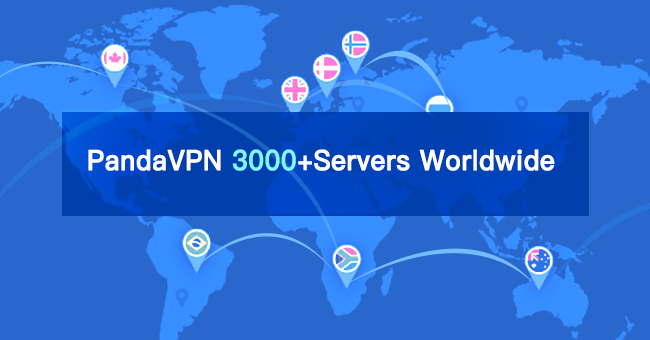
3000+ VPN Servers Around the World – The large global server network offers you plenty of chances to get an alternative IP address. Always choose the servers close to your location, which makes sure you get the fastest VPN speed.
High Speed Servers to Offer Good Experience – PandaVPN doesn’t set a limit on bandwidth and speed. You can enjoy a lightning-fast and stable speed.
ECC Encryption to Secure your Connections – Once connecting to PandaVPN, all traffic you send and receive online is through a private tunnel, safe and private.
0 Log Policy to Respect your Privacy – Signing up for PandaVPN requires no of your profile name and email address. Instead, you get a string of random digital numbers as your account. Also, PandaVPN doesn’t log your search history, browsing habits, and any files you download via PandaVPN.
3 Devices Supported with the Same Account – Devices including Android mobile phones, Android tablets, iPhone, iPad, iMac, Windows PC, Android TV, etc., are all supported.
Here is the step-by-step guide to unblock Twitter ban:
- 1. Sign up for PandaVPN.
Go to PandaVPN’s official page and tap on Get PandaVPN to enter the sign-up page. You’ll get a random digital account. Set a unique and complex password for your account.
Then, select a VPN plan and pay for it. PandaVPN supports various payment methods, including Visa, Mastercard, PayPal, UnionPay, Bitcoin, etc. There are several VPN plans for you to choose from. And the best deal goes to the 1+1-year package. Buy one year’s VPN service and you’ll get one extra year’s service.
- 2. Download PandaVPN.
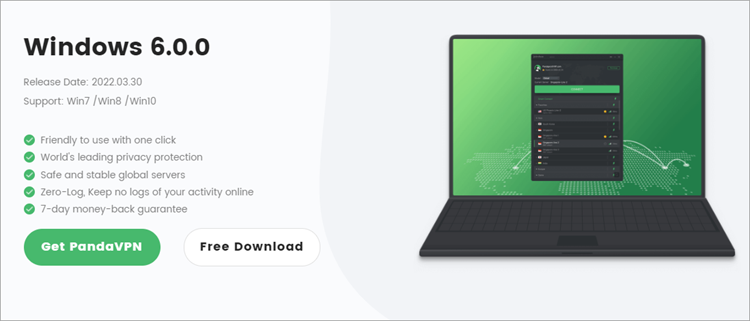
Next, go back to PandaVPN’s download page to download PandaVPN and install it on your device. As mentioned earlier, multiple devices including Android, iOS, Windows, macOS, Linux, and Android TV are supported. Here we take PandaVPN for Windows as an example.
- 3. Connect to a server that is located in a country with unlimited access to Twitter.
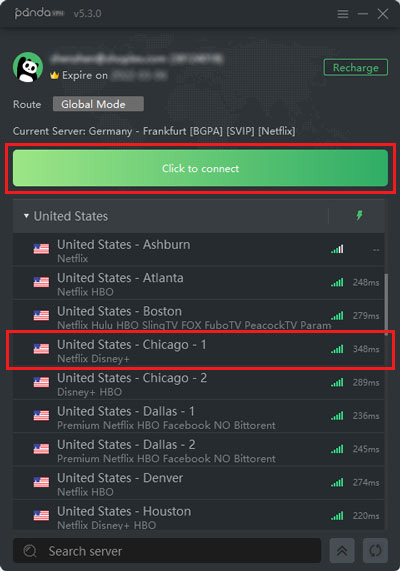
After installation is complete, run PandaVPN, log in to your account and password, and choose a server located in a country where there is no Twitter ban.
Besides unblocking Twitter, what else can PandaVPN do?
PandaVPN is more than a Twitter VPN. Except for unblocking Twitter, using a VPN has many other advantages.
Be Anonymous Online – By connecting to other IP addresses, you can hide your real location with PandaVPN. That way, you can browse the web anonymously.
Stay Safe from Hackers – There are hackers hidden in free public Wi-Fi waiting to steal your private information. PandaVPN offers you a safer Wi-Fi environment.
Ensure Remote Work Security – When an employee is on a business trip and needs to send confidential data, a VPN is a must-have to protect the security of data transmission.
Block ISP Tracking – Your online traffic is routed through your ISP. That’s why your ISP can track your every move online. Using PandaVPN can block ISP tracking.
Stream without ISP Throttling – Your ISP may limit your internet speed when you’re streaming. To avoid such ISP throttling as much as possible, you can ask for help from PandaVPN.
Twitter account suspended? How to unsuspend a Twitter account?
Twitter may lock your account and request you to confirm that you are the valid owner of the account. To unlock the account:
1. Log in to your account.
2. Look for the message letting you know that your account has been locked.
3. Click or tap Start.
4. Enter your phone number.
5. Twitter will send you a text message or a phone call, with a verification code. It may take a few minutes for the code to be delivered to your phone.
6. Once you’ve entered the verification code, click or tap Submit to unlock your account.
Twitter may also suspend your account in response to reports of spam or abusive behavior. To unsuspend the account:
1. Log in to your account.
2. Open a new browser tab and file an appeal.
Conclusion
All in all, besides unblocking Twitter, a VPN also encrypts your traffic and shields your online activities from others. After all, many eyes are waiting to snoop on your privacy and online data.
Data is valuable. Advertisers and hackers on the internet would be willing to collect your preferences. Do remember to use a VPN to protect your data and identity on the internet. It’s important nowadays!
Offering fast, secure, and private connections, PandaVPN is a great choice. It also has a quite competitive price compared with the industry giants like ExpressVPN and NordVPN. Get PandaVPN to have a try >

A tech enthusiast who currently works for PandaVPN enjoys sharing VPN and tech industry information and is passionate about helping others solve their problems.
Related Posts

Featured Posts