

What Is a VPN? The Complete 2026 Guide to How a VPN Works
 Sharon
 2026.11.17
As more of our daily activities move online, protecting personal information and maintaining unrestricted internet access have become increasingly important. From streaming movies and working remotely to shopping online and browsing on public Wi-Fi, internet users face growing concerns about data privacy, cybersecurity, and geographical restrictions.
One technology that addresses many of these challenges is a Virtual Private Network (VPN).
But what exactly is a VPN? How does it work, and why should you consider using one in 2026?
In this comprehensive guide, we’ll explain the basics of VPN technology, explore how encryption and VPN servers protect your online activities, and introduce how PandaVPN combines advanced security features with high-speed global connections to deliver a more private and flexible internet experience.

What Is a VPN?
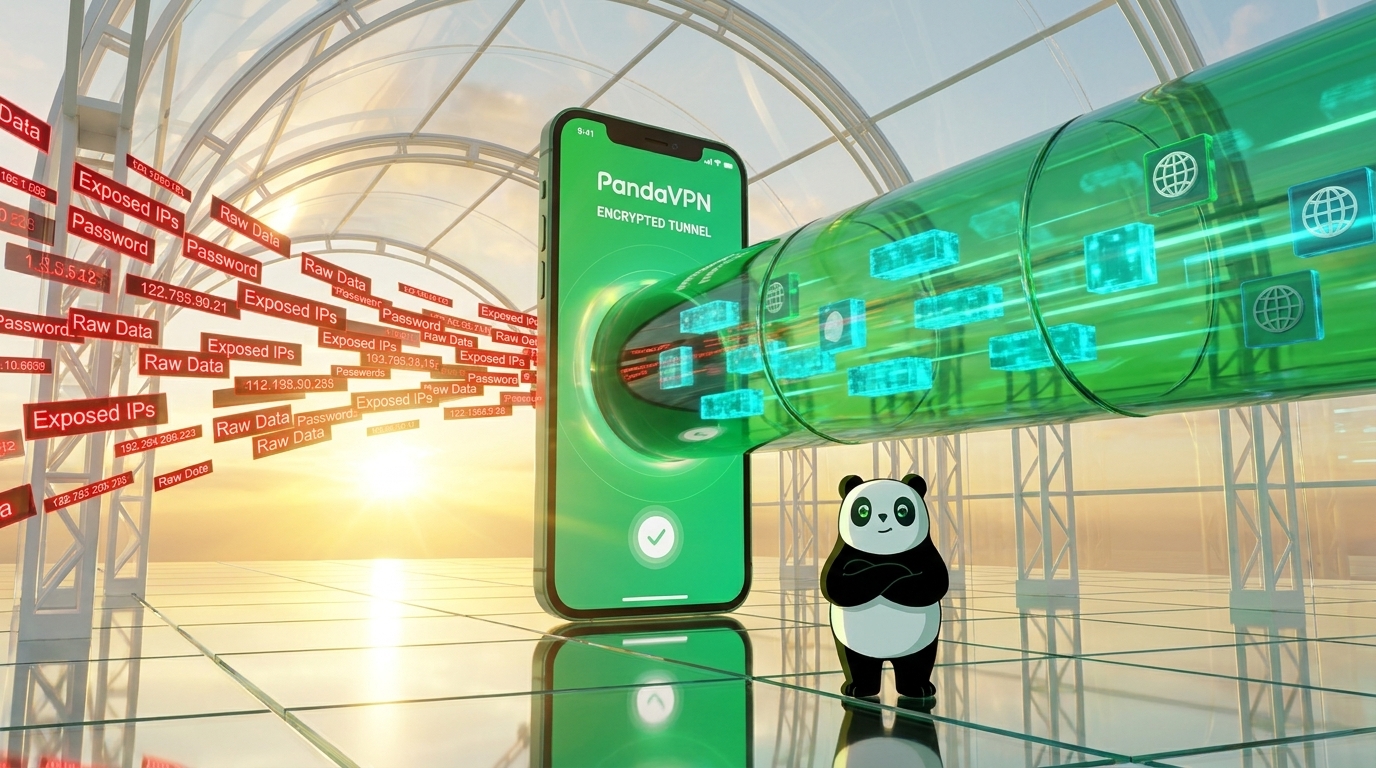
A Virtual Private Network (VPN) is a privacy and security tool that creates an encrypted connection between your device and a remote VPN server. This connection, commonly called an encrypted tunnel, helps protect the data traveling between your device and the VPN server.
Normally, when you access a website, your internet traffic passes through your Internet Service Provider (ISP), which can potentially observe information about your online activity. Your real IP address may also be visible to the websites and services you visit.
When you connect to a VPN, your internet traffic is first routed through a VPN server before reaching its final destination. This changes how your online connection appears to external websites and helps prevent unauthorized parties from easily accessing your data.
A VPN provides two important benefits:
1. Hides Your Real IP Address
Your IP address can reveal information about your approximate geographical location and internet connection.
A VPN replaces your public-facing IP address with the IP address of its server. As a result, websites and online services generally see the VPN server’s IP address rather than your original one.
This makes it more difficult for websites to associate your browsing activity with your actual IP address and location.
2. Encrypts Your Internet Traffic
Encryption converts readable information into coded data that cannot be easily understood without the appropriate decryption key.
When you use a VPN, supported network traffic is encrypted before being transmitted through the VPN tunnel. This adds an important layer of protection, particularly when connecting through unsecured or shared public Wi-Fi networks.
Together, IP masking and encryption help improve online privacy and reduce exposure to certain cybersecurity risks.
How Does a VPN Work?
Understanding how a VPN works doesn’t require an advanced technical background. Although the underlying technology involves encryption algorithms, authentication systems, and network protocols, the basic process is relatively straightforward.
Here’s what happens when you connect to a VPN:
Step 1: Connect to a VPN Server
First, open your VPN application and select a server location.
Your VPN client establishes a connection with the selected server. During this process, the client and server authenticate the connection and negotiate the cryptographic keys needed to protect your data.
Step 2: Establish an Encrypted Tunnel
After authentication, the VPN creates a secure communication channel between your device and the remote server.
This encrypted tunnel protects the supported data traveling between both endpoints, making it much harder for someone monitoring the network to read your information.
Step 3: Encrypt Your Internet Traffic
Before your data leaves your device through the VPN connection, the VPN software encrypts it.
For example, if you’re checking your email, accessing an online banking service, or browsing a website, the data traveling through the VPN tunnel is protected by encryption.
Even if someone intercepts the encrypted traffic while it travels across an unsecured network, they should not be able to read its contents without the necessary decryption keys.
Step 4: Route Traffic Through the VPN Server
Your encrypted traffic reaches the selected VPN server, where it is decrypted and forwarded to the destination website or online service.
The destination website sees the VPN server’s public IP address instead of your original IP address.
This is how a VPN helps conceal your actual IP address and allows you to connect through servers in different geographical regions.
Step 5: Return Data Through the VPN Tunnel
When the website sends information back, the VPN server routes the response through the encrypted connection to your device.
Your VPN application then decrypts the incoming data, allowing you to browse, stream, or communicate as usual.
The entire process happens in the background, so you can continue using the internet without manually encrypting or decrypting individual files.
Why Should You Use a VPN in 2026?
VPN technology is no longer limited to cybersecurity professionals or people with advanced technical knowledge. It has become a practical tool for everyday internet users.
Here are some of the most common reasons to use a VPN.
1. Protect Your Privacy on Public Wi-Fi
Public Wi-Fi is convenient, but networks in airports, hotels, coffee shops, and other shared spaces may expose users to security risks.
A VPN encrypts supported network traffic, making intercepted data more difficult to read. This provides an additional layer of protection when you connect through networks you don’t control.
2. Access International Online Content
Some websites, streaming services, and digital platforms offer different content depending on your geographical location.
A VPN allows you to connect through servers in different countries, changing the public IP address that online services see.
This can help you access region-specific websites and content where permitted by the relevant service’s terms and local regulations.
3. Reduce Exposure to Network Monitoring
Internet Service Providers and network administrators may be able to observe certain aspects of your internet activity.
A VPN encrypts traffic between your device and the VPN server, helping prevent local network observers from easily inspecting its contents.
However, a VPN does not make you completely anonymous. Websites may still identify you through cookies, account logins, browser fingerprinting, and other tracking technologies.
4. Enjoy More Flexible Streaming and Gaming
For entertainment enthusiasts, a VPN can provide access to different regional server locations and help overcome certain network-related limitations.
Connecting to a nearby VPN server may also offer a more stable connection in some circumstances.
Actual streaming quality and gaming latency depend on factors such as server distance, network congestion, routing quality, and your original internet speed.
Why Choose PandaVPN? Security, Speed, and Global Connectivity
Not all VPN services deliver the same experience. Encryption standards, server infrastructure, connection stability, and device compatibility can make a significant difference in everyday use.
PandaVPN is designed to bring these essential features together, offering a combination of advanced encryption, global server coverage, dedicated network infrastructure, and convenient multi-device support.
Here are some of the key features that make PandaVPN worth considering.
1. Advanced ECC Encryption and a No-Logs Policy
Online privacy starts with protecting your data from unauthorized access.
PandaVPN incorporates Elliptic Curve Cryptography (ECC) alongside 256-bit encryption technology to help secure network communications.
ECC is a modern cryptographic approach that provides strong security with relatively efficient key sizes, making it suitable for applications where both protection and performance matter.
PandaVPN also states that it follows a strict no-logs policy, meaning it does not record or retain users’ browsing histories or connection logs.
Together, these features are designed to provide a more private browsing experience while helping protect sensitive information during everyday internet use.
2. Patented Acceleration Technology and High-Speed IPLC Connections
Security shouldn’t come at the expense of connection quality.
One common concern among VPN users is reduced internet speed caused by encryption overhead, inefficient routing, or congested servers.
PandaVPN addresses these challenges through specialized network optimization:
- Patented Acceleration Technology: Proprietary acceleration algorithms are designed to improve connection efficiency, reduce latency, and minimize packet loss.
- IPLC Dedicated Lines: International Private Leased Circuit (IPLC) infrastructure provides dedicated international network routes designed to support stable, high-speed data transmission.
- Up to 10 Gbps Bandwidth: Supported server infrastructure offers bandwidth capacity of up to 10 Gbps.
- Unlimited Traffic: Enjoy unrestricted data usage without conventional monthly data caps.
These technologies are particularly useful for users who frequently stream high-definition videos, transfer large files, or need reliable international connections.
3. A Global Network with More Than 6,000 Servers
A VPN’s server network plays an important role in determining connection flexibility and performance.
A larger server network gives users more options when choosing a location, helping them find a suitable connection based on their geographical needs.
PandaVPN provides access to:
- 6,000+ servers worldwide
- 232 server locations
- Coverage across 102 countries
- Specialized streaming servers and dedicated streaming IP options
Whether you’re looking for a nearby server for everyday browsing or a particular region for international entertainment, PandaVPN offers a wide selection of connection options.
Its streaming-optimized infrastructure is designed to support access to popular platforms, including:
- Netflix
- Hulu
- HBO Max
- Disney+
- AbemaTV
Streaming availability and performance may vary depending on your selected server, platform restrictions, and regional licensing policies.
4. One Account, Up to 10 Simultaneous Devices
Today’s internet users rarely rely on a single device.
You might use a Windows laptop for work, an iPhone for communication, an Android tablet for entertainment, and a smart TV for streaming.
Managing separate VPN subscriptions for every device can quickly become inconvenient.
PandaVPN simplifies the process by supporting up to 10 simultaneous device connections under one account.
It also offers applications for multiple operating systems and devices:
Desktop Platforms
Mobile Devices
Smart TVs
With straightforward applications and one-click connectivity, PandaVPN makes it easier to protect multiple devices without complicated manual configurations.
PandaVPN Pricing: Which Subscription Plan Is Right for You?
Choosing a VPN subscription involves more than comparing monthly prices. You should also consider subscription length, renewal conditions, device limits, and available customer support.
PandaVPN offers several subscription options to accommodate different usage preferences.
| Subscription Plan | Effective Monthly Price | Billing Details |
|---|---|---|
| 12 Months + 12 Months Free | Approximately US$2.50/month | US$59.99 upfront for 24 months; renews at US$59.99/year |
| 3 Months | US$6.99/month | US$20.97 billed every 3 months |
| 1 Month | US$9.99/month | US$9.99 billed monthly |
All listed plans include the following features:
- Up to 10 simultaneous device connections
- Access to 6,000+ global servers
- Network infrastructure supporting up to 10 Gbps bandwidth
- Unlimited traffic
- 7-day money-back guarantee
- 24/7 technical support
Which plan should you choose?
If you plan to use a VPN regularly, the 24-month subscription offers a lower effective monthly cost. It’s a practical option for users who want long-term protection across multiple devices.
The 3-month plan provides a middle ground between affordability and flexibility, while the monthly subscription is suitable for users who prefer a shorter commitment.
Before purchasing, review the latest PandaVPN pricing and subscription details, including renewal terms and refund conditions.
Frequently Asked Questions About VPNs
Still have questions about VPN technology? Here are answers to some common questions.
Is Using a VPN Safe?
Generally, using a reputable VPN service is a safe way to add encryption and improve online privacy.
However, your level of protection depends on the provider’s security practices, encryption implementation, privacy policy, and overall reliability.
It’s important to choose a VPN provider with transparent privacy policies and appropriate security features.
Does a VPN Hide My IP Address?
Yes. When your VPN connection is active, websites generally see the public IP address of the VPN server rather than your original public IP address.
However, this does not guarantee complete anonymity, as websites may still identify you through other tracking methods.
Can a VPN Make My Internet Faster?
A VPN does not automatically increase your internet speed.
In some situations, optimized VPN routing may improve connection performance by avoiding inefficient network paths. However, encryption overhead, server distance, and network congestion can also reduce speeds.
Choosing a well-maintained VPN server close to your target service may help deliver a more consistent experience.
Can I Use a VPN on Multiple Devices?
Yes, depending on your VPN provider’s simultaneous connection policy.
PandaVPN supports up to 10 devices connected at the same time under one account, making it convenient for households and users with multiple devices.
Does a VPN Protect Me from All Online Threats?
No. A VPN primarily protects network traffic between your device and the VPN server and helps conceal your original IP address.
It does not automatically prevent phishing attacks, malware infections, malicious downloads, or account compromises.
For more comprehensive protection, combine a VPN with updated software, strong passwords, multi-factor authentication, and safe browsing habits.
Final Thoughts: Make Your Internet Experience More Private with PandaVPN
As online activities continue to expand in 2026, protecting personal information and maintaining control over your digital privacy have become increasingly important.
A VPN offers a straightforward way to encrypt supported internet traffic, mask your public IP address, and connect through servers in different geographical locations.
Whether you’re concerned about public Wi-Fi security, interested in international streaming, or simply looking for a more flexible browsing experience, choosing the right VPN can make a meaningful difference.
With ECC encryption, a stated no-logs policy, patented acceleration technology, IPLC dedicated lines, more than 6,000 servers, and support for up to 10 simultaneous devices, PandaVPN brings together the features many modern internet users look for in a VPN service.
Ready to explore a more private and flexible internet experience?
Visit PandaVPN to explore its features, compare subscription plans, or download the PandaVPN app and get started today.

Related Posts



Featured Posts