

How to Use PandaVPN on iOS
 Sharon
  2026.10.30
In today’s digital age, safeguarding your online privacy and breaking through regional restrictions on mobile devices is essential. PandaVPN delivers top-tier encryption, lightning-fast connections, and a seamless one-tap experience across your iOS and Apple Silicon macOS devices.
Whether you are streaming your favorite shows, gaming globally, or browsing securely on public Wi-Fi, PandaVPN ensures your data remains completely private.

Why Choose PandaVPN for iOS?
-
Bank-Grade Encryption: Utilizes the highest level of ECC encryption to protect your personal data privacy and security
-
Global Server Network: Easily bypass geo-blocking and unblock hot streaming services, apps, and games worldwide
-
Optimized for Apple Ecosystem: Fully built and optimized for iOS (iOS 15 up to iOS 27)
-
Flexible Options: Choose between the ad-supported PandaVPN Lite or the feature-rich, ad-free PandaVPN Pro experience.
Step-by-Step Guide: How to Use PandaVPN on Your iPhone
Getting started with PandaVPN on your iOS device takes only seconds. Follow these quick steps to secure your connection:
1. Download & Install

-
Open the App Store on your iPhone or iPad.
-
Search for PandaVPN and tap the Get or cloud download icon.
-
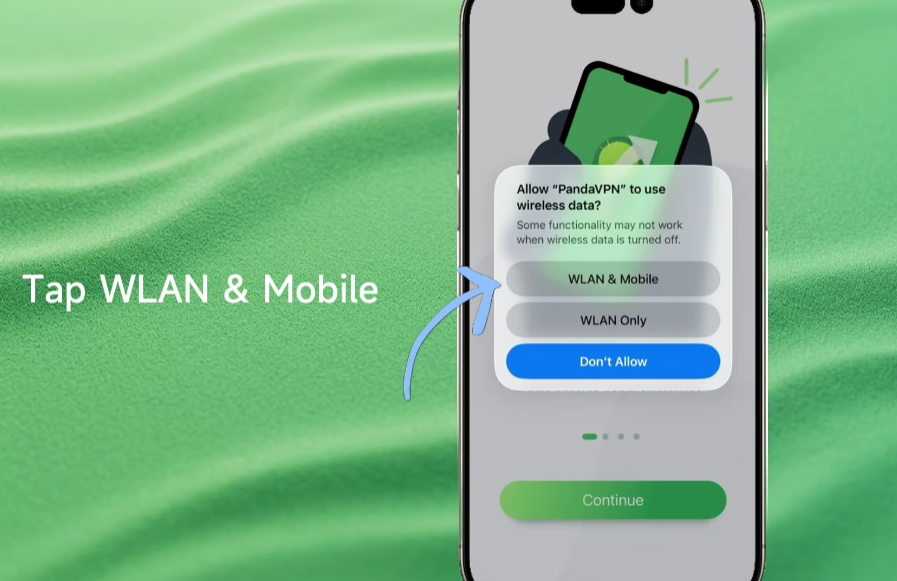
When iOS asks for wireless data permissions, tap WLAN & Mobile to ensure uninterrupted connectivity.
2. Sign In
-
Open the PandaVPN app.
-
Sign in using your automatically generated digital account (first-time users can enjoy a free trial).

3. Connect & Browse Securely
-
Tap or swipe up the Connect button on the home screen.
-
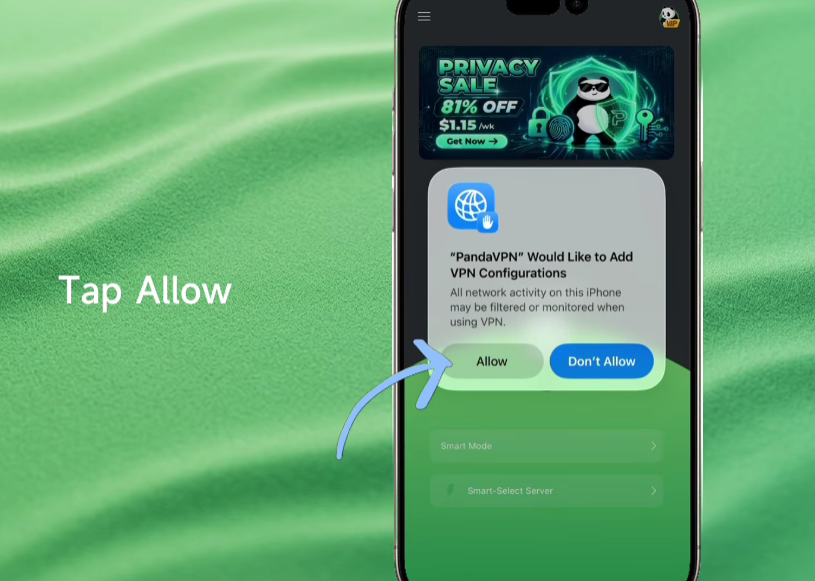
When iOS prompts you that “PandaVPN Would Like to Add VPN Configurations,” tap Allow.
-
You are now safely connected! Need a specific server location? Simply search or pick your desired regional line from the server list.

Ready to experience ultimate digital freedom and privacy? Download PandaVPN for iOS today, take advantage of the 3-day free trial and 7-day money-back guarantee, and protect up to 10 of your devices with just one tap!

Related Posts



Featured Posts